Guide
How to Delete Your Kalshi Account in 2026 (3 Things to Do First)
Sell your positions, cancel your orders and withdraw to $0.00, then tap Deactivate your account under Settings, Account & security. Logging back in reopens it, and brokers still sell Kalshi contracts.

To delete your Kalshi account, first sell every open position, cancel every resting order and withdraw your balance to $0.00. Then go to Settings, Account & security, scroll to the bottom and tap Deactivate your account, then Confirm. Kalshi's support team cannot do it for you. Logging back in reopens the account, so self-exclusion is what keeps it shut.
Here are the steps, the tools that hold, and one gap to close: Kalshi contracts are also sold through brokers.
Before you start: clear three conditions
- Sell every open position.
- Cancel every resting order.
- Withdraw until your balance is $0.00. In the Transfers tab, choose Withdraw from Kalshi and pick a method. A bank transfer is free and takes a few business days. A crypto withdrawal takes about 30 minutes and cannot be reversed.
Kalshi checks all three before it lets you continue. A security hold on recent deposits can delay the last one, so start early.
How to deactivate your Kalshi account
- Open Settings on the Kalshi app or website, or go to kalshi.com/account/profile.
- Choose Account & security and scroll to the bottom.
- Tap Deactivate your account.
- Check that the confirmation screen shows a green tick next to each of the three conditions, then tap Confirm.
Kalshi says its representatives cannot deactivate an account manually, so this is the only route. If something is stuck, contact support from the app menu under Get help, Chat with support, or email support@kalshi.com. There is no phone support.
Logging back in reopens it
A deactivated Kalshi account comes back when you log in again with the same sign-in method. Kalshi allows one account per person, so you return to the same account. That makes deactivation a weak barrier if you are trying to stop. The tools below last until the date you set, even if you reopen the account.
Self-exclusion and the tools that hold
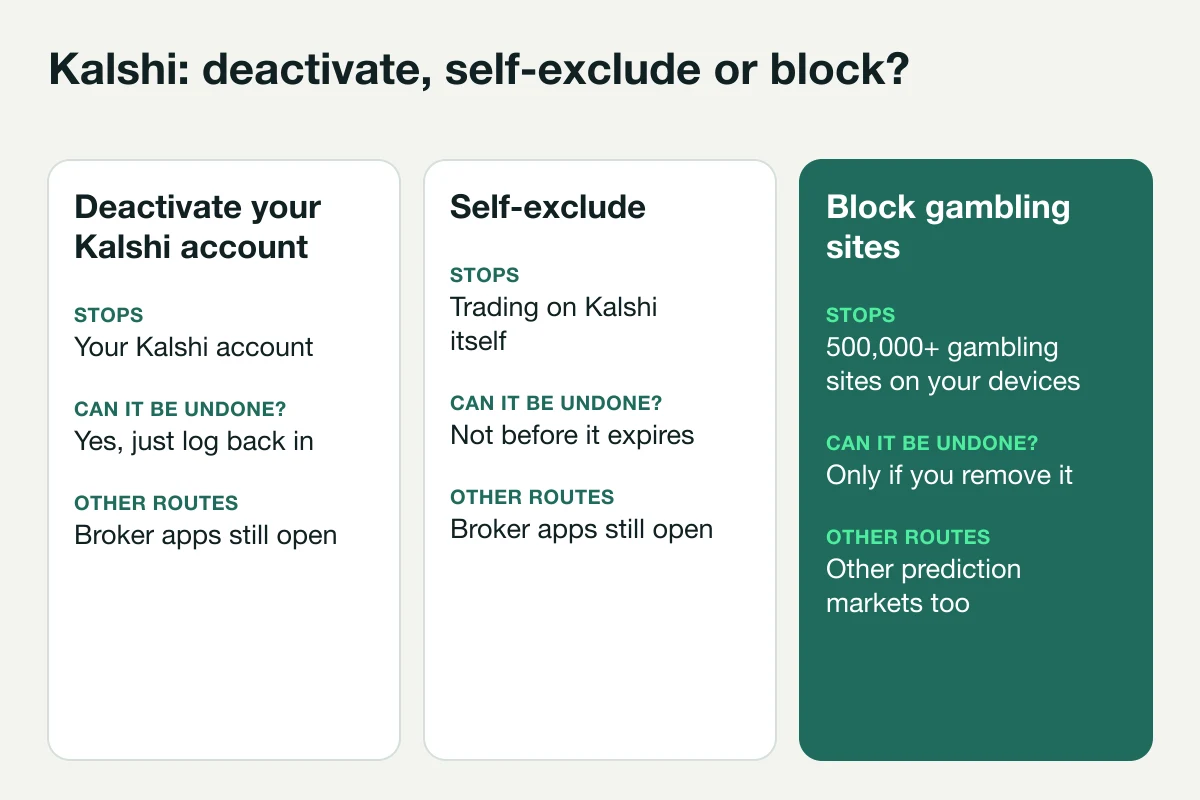
- Where: on the website, open the menu in the sidebar and choose Responsible Risk Management. In the app it sits under Settings or Account Options. Once you set a tool, you cannot lift or change it before it expires.
- Voluntary self-exclusion: you choose the term in the app. You cannot sell open positions while it lasts, so sell them first.
- Trading break: a pause of a day or more, with the same rule on open positions.
- Funding cap: a monthly deposit limit that starts at once and cannot be removed early. Traders aged 18 to 20 get a $2,500 monthly cap by default.
SelfExclude.io adds one more layer. One sign-up, with a government ID, excludes you for 1, 3, 6 or 12 months from every prediction market connected to it. Kalshi and Novig are live, and Polymarket, Fanatics and Robinhood are listed as coming soon.
Closing Kalshi does not close the broker route
Kalshi's own help pages say a trading break or self-exclusion does not stop you trading Kalshi products through a futures broker. Robinhood has offered Kalshi contracts since March 2025, and other trading apps sell them too. Deleting your Kalshi account leaves those doors open.
If you have a Robinhood account, use its own opt-out. Under Account, Menu, Investing, Event contracts trading, Event contract settings, you can switch on Hide sports prediction markets, which can be reversed. A full self-exclusion from event contracts goes through robinhood.com/contact, after a review and a waiting period.
Why your state's self-exclusion does not reach Kalshi
State self-exclusion lists bind the sportsbooks and casinos a state licenses. Kalshi says it is a federally regulated exchange and needs no state gambling licence, so it does not check those lists. Our explainer on why self-exclusion misses prediction markets covers the court fights over that claim.
Your personal data
Kalshi says account records cannot be fully deleted, because the law requires it to keep them for identity checks and compliance. Federal rules generally require trading records to be kept for at least five years. California privacy requests go to legal@kalshi.com, but Kalshi says that law does not apply to most of what it holds.
What deleting Kalshi does not stop
Kalshi is one of many places to bet on a game. Polymarket, sportsbooks, sweepstakes casinos and offshore sites are all still there. Add the layers that reach further:
- Put a gambling blocker on every phone, tablet and computer you use. Betclear blocks gambling websites with encrypted DNS on iPhone, Android, Mac and Windows 11, using a list of more than 500,000 gambling sites that updates automatically. kalshi.com, polymarket.com and polymarket.us are on it. A blocker cannot reach event contracts inside an investing app such as Robinhood, so use that app's own opt-out. No blocker is perfect, because new sites appear all the time. If one gets through, you can report it.
- Delete the Kalshi app, and self-exclude on every other prediction market you have used. If that includes Polymarket, our guide to how to delete your Polymarket account covers both of its apps.
- Remove saved cards and bank links, and ask your bank whether it can block gambling transactions.
Get support
Deleting an account takes away one route, not the urge. Call or text 1-800-MY-RESET (1-800-697-3738), the National Problem Gambling Helpline, any time, or chat at 1800myreset.org. It is free and confidential. Kalshi also points traders to Birches Health for counselling.
Sources
- Kalshi Help Center: Deactivating and reactivating, Contact Kalshi support, Can I have multiple Kalshi accounts, Responsible trading hub, Trading break, Voluntary self-exclusion, Personalized funding cap, Bank withdrawals, Crypto withdrawals, and How is data stored (help.kalshi.com)
- Kalshi: Expanding protections for 18 to 20-year-old traders, October 27, 2026 (news.kalshi.com); Kalshi privacy policy (kalshi.com, archived copy of June 9, 2026)
- SelfExclude.io (selfexclude.io)
- Robinhood: Opting out of event contracts, and the prediction markets hub (robinhood.com)
- Code of Federal Regulations: 17 CFR 1.31, regulatory records (law.cornell.edu)
- National Council on Problem Gambling: 1-800-MY-RESET announcement, January 29, 2026 (ncpgambling.org)
Frequently asked questions
- Why can't I deactivate my Kalshi account?
- Kalshi only lets you deactivate once you have sold every open position, cancelled every resting order and withdrawn your balance to $0.00. The confirmation screen shows which of the three is still missing. A security hold on a recent deposit can delay the withdrawal.
- Can Kalshi support delete my account for me?
- No. Kalshi says its representatives cannot deactivate accounts manually. You have to do it yourself under Settings, Account & security, Deactivate your account.
- Can I reopen a deactivated Kalshi account?
- Yes. Logging back in with your original sign-in method reopens it. Any trading break, self-exclusion or funding cap you set stays in place until its end date.
- Does Kalshi self-exclusion stop me trading on Robinhood?
- No. Kalshi says its self-exclusion does not limit access to Kalshi products through a futures broker. Use Robinhood's own event contract opt-out, or ask Robinhood for a full self-exclusion.
- Does Kalshi delete my data when I close my account?
- Not fully. Kalshi says the law requires it to keep account records for identity checks and compliance, and federal rules generally require trading records to be kept for at least five years.
Betclear is a gambling website blocker, not a medical service. If you need clinical or crisis support, please contact a qualified professional or a responsible-gambling helpline.